Free with ads · new customers: a week for $0.99
or 3 months for $9.49
· see plans
Emma · 14 km/hOak Street 14 · 2 min ago
Consent‑first. Nobody is on your map without sharing their own code.iPhone & Android. One circle across both.15 languages.
In the app
What it looks like on the phone.
Check in with two tapsTold when they arriveSOS reaches the family
The walk home is the part you think about
Most parental worry is concentrated in a few predictable windows: the walk to school, the journey home, the hours after an activity ends. You do not need to watch a map through all of it. You need to be told when it finished well.
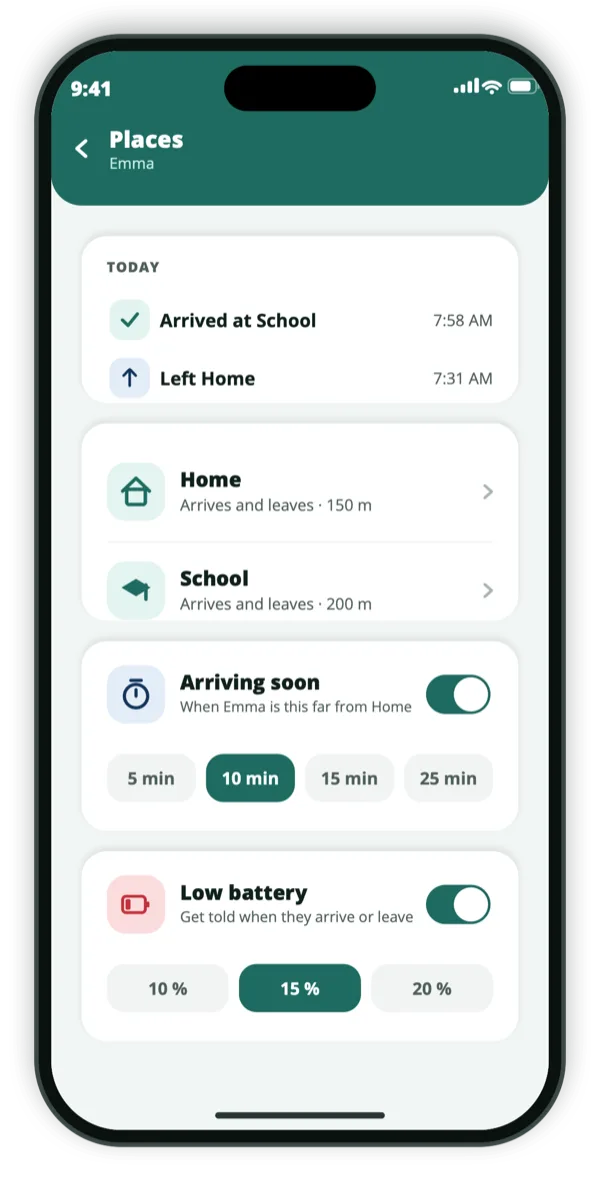
Saved places do exactly that. Add School and Home, and Be Close tells you when your child arrives and when they leave, without anyone having to remember to send a message. “Arriving soon” gives you a warning five to twenty-five minutes before they reach you, which is usually enough to put the kettle on or start cooking.
Arrival and departure alerts for school, home and anywhere else
Arriving soon, with a countdown on the lock screen
Safe areas drawn around a park, a club or a friend’s street
Alerts the moment someone enters or leaves one
A child can tell you things too
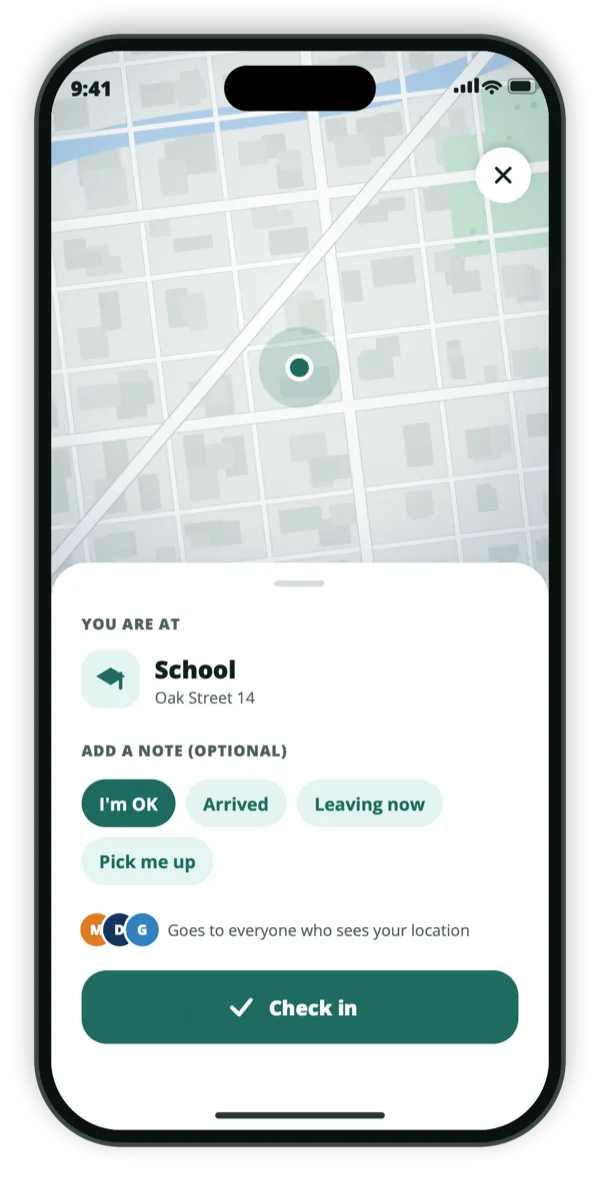
Location tells you where someone is, not how they are. Check-in gives a child two taps to say where they are and that they are fine, with a short note: I’m OK, Arrived, Leaving now, Pick me up. It is faster than a phone call and less intrusive than being asked.
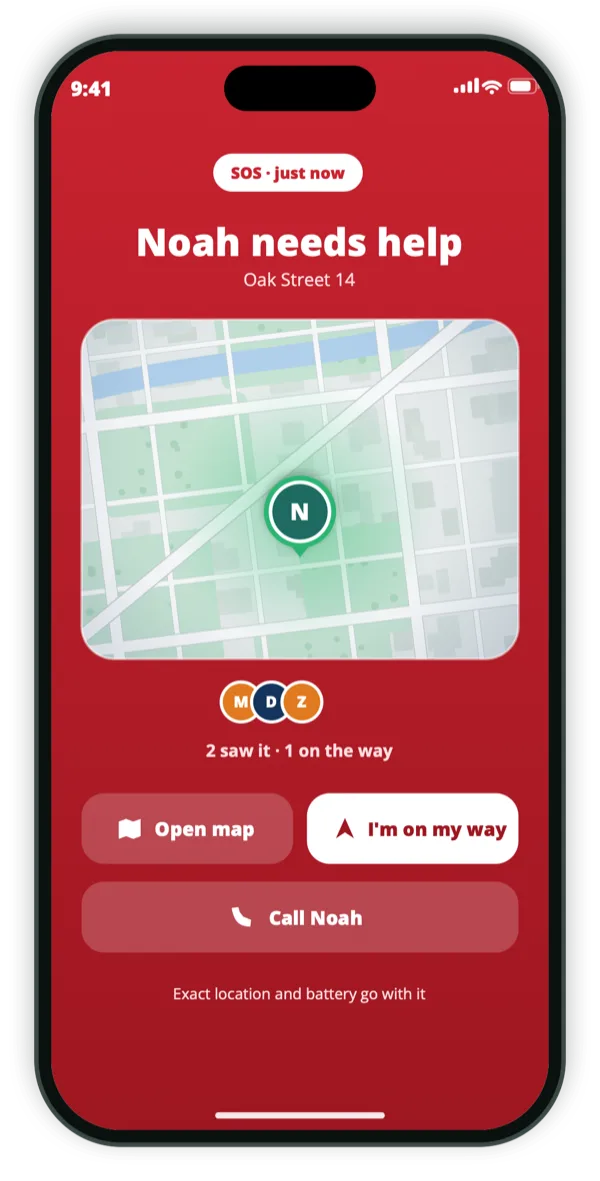
If something is wrong, holding SOS for three seconds alerts everyone who can see their location at once, keeps sending their position so you can follow rather than guess, and offers them emergency services on the same screen. You can see who else in the family is already on the way.
Check-in with a short note, in two taps
Ask a child to check in when you have not heard from them
SOS held for three seconds alerts the whole circle
Position keeps broadcasting while SOS is active
Built on agreement, and that matters at this age
Be Close is designed so a child installs it and shares their own code. They can see that sharing is on. Making that visible is not a weakness in a family app — it is what makes it a shared arrangement a teenager can live with rather than something done to them, which tends to end with a phone left at a friend’s house on purpose.
Be Close is intended for children under 13 only with a parent’s approval, and information collected from those accounts is never used for marketing or advertising. The privacy policy sets out exactly what is collected and how long it is kept.
The child installs the app and shares their own code
Sharing is always visible to them
Under 13 only with parental approval
No advertising use of children’s data
How we think about this
Everyone on the map agreed to be there.
Be Close is built for families and trusted friends, and it only works with consent. There is no
hidden mode, and no way to add someone who has not agreed.
They install it themselvesA person’s location appears only after they install the app and share their own code with you.
They can always see it’s onAnyone sharing can see that sharing is on — and stop it, at any moment, without asking.
Never sold, never advertised againstLocation data is not sold and is not used for ad targeting.
Questions
The things people ask first.
Will my child know they are being located?
Yes, always. Be Close has no hidden mode. The app is installed by the child, sharing is visible to them, and they can stop it at any time.
What age is it suitable for?
It is made for families generally. Children under 13 may use it only with a parent’s approval, and their information is never used for marketing or advertising.
Does my child need their own phone?
Yes. Be Close reports the position of the phone it is installed on, so each person who appears on the map needs a device running the app.
What happens if their battery dies?
The map keeps their last position and the time it was recorded. You can also be warned before it happens, at twenty, fifteen or ten per cent.
Get the app
Set it up together, this evening.
Free on both stores. Sit down with your child, install it on both phones and exchange codes once — it takes about a minute, and they can see exactly what is shared.